How to convert a PDF to PowerPoint: a step-by-step guide
Ενημερώθηκε: 2 Οκτωβρίου 2026
Αυτός ο οδηγός δεν είναι ακόμη διαθέσιμος στα ελληνικά, γι’ αυτό εμφανίζεται στα αγγλικά. Το ίδιο το εργαλείο λειτουργεί στα ελληνικά.
A report to present, a brochure to show at a meeting, slides that only exist as a PDF: PDF to PowerPoint turns every chosen page into a slide. The page's lines, boxes, logos and pictures sit behind the text, and each block of text is a text box at its place - in its size, weight and colour - so you can change a word or move a heading. It all happens in your browser; nothing is uploaded.
Δοκιμάστε δωρεάν, χωρίς εγγραφή: τα αρχεία σας δεν φεύγουν ποτέ από τη συσκευή σας.
Με λίγα λόγια
- Drop your PDFs on the page, or press Add files.
- Narrow the pages if you only want some as slides.
- Choose the slide size and whether the page graphics come along.
- Press Save as PowerPoint: the presentation is saved to your device straight away.
Add the files
Drop the PDFs anywhere on the page, or press Add files. The text is read as each file loads - the list counts its words. Every page is chosen to begin with; click or drag on the thumbnails to narrow it down, or use the bar above them. The Text view above the thumbnails shows the text each slide will carry.
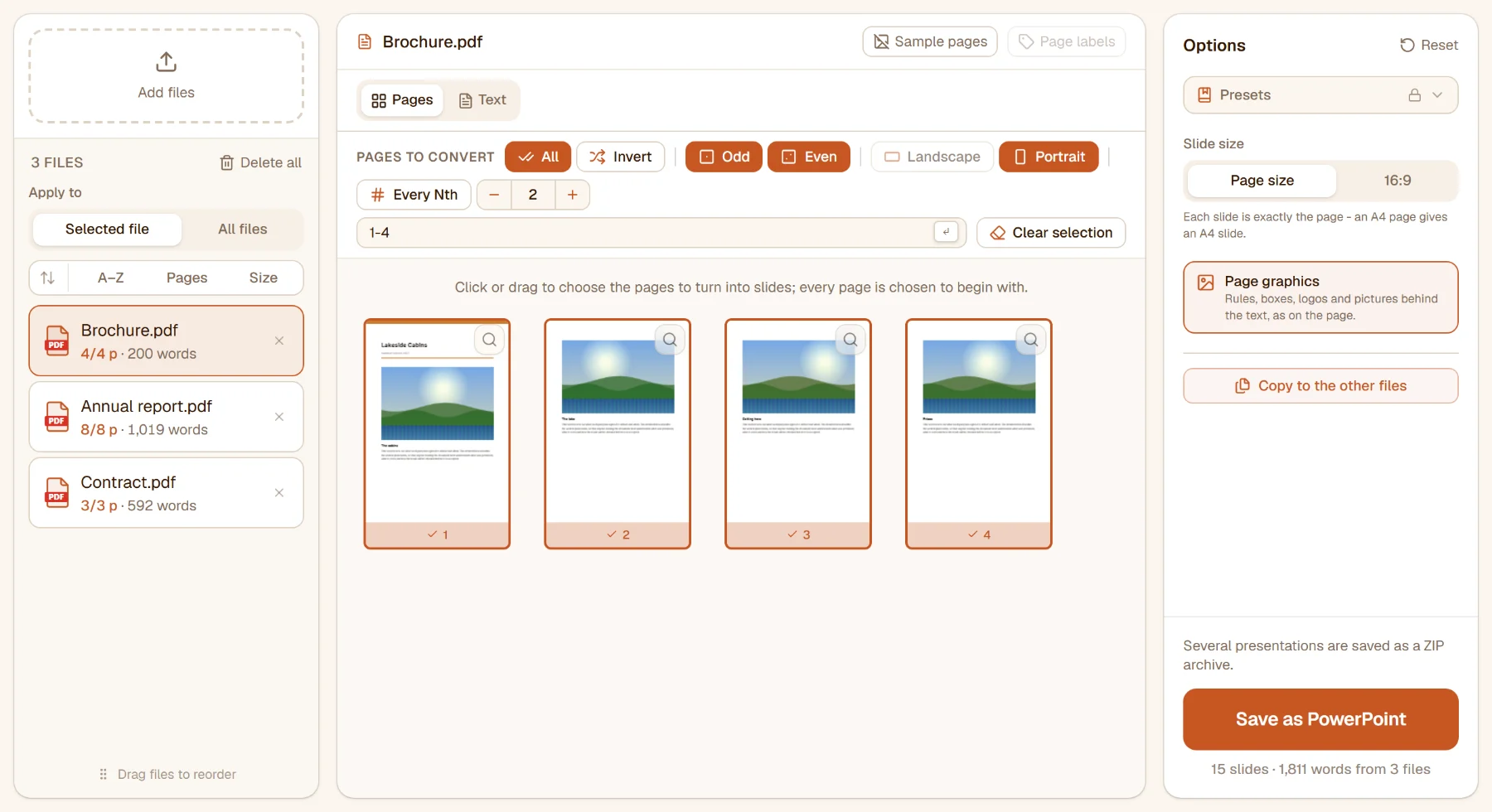
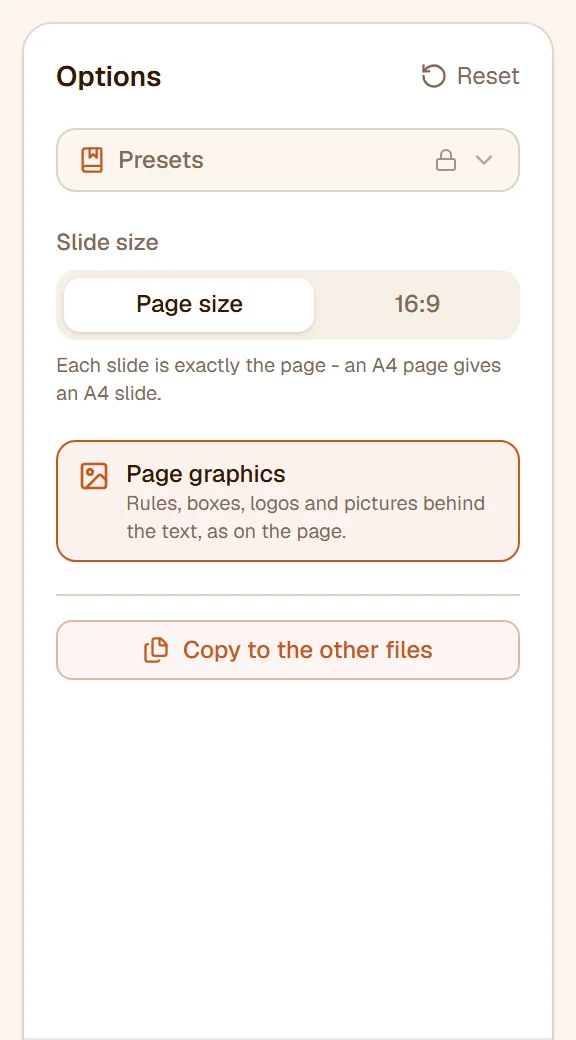
Slide size and page graphics
- Slide size - Page size makes each slide exactly the page (an A4 page gives an A4 slide); 16:9 makes widescreen slides with the page fitted in and centred.
- Page graphics (on) - the rules, boxes, logos and pictures sit behind the text as one picture per slide, so the slide looks like the page. Switch it off for text boxes alone on blank slides - the version to rebuild in your own template, and a fraction of the size.
The PDF's fonts are not copied into the deck. Each piece of text gets the PowerPoint font of the same name where there is one - Arial, Times New Roman, Calibri - otherwise a similar one, spaced so it fills the width the PDF drew.
Save
Press Save as PowerPoint. The line under the button counts the slides and words. One .pptx per PDF is saved to your device at once - several together as a ZIP. A scan needs a text layer for its words to become text: run it through OCR - make a PDF searchable first.
Several files at once
Above the file list, Apply to decides how several files are handled. Under Selected file each file has its own pages and settings; under All files one rule by page position and one set of settings are used for every file. Copy to the other files gives the settings on screen to the other files.
Limits
Without an account, and with a free one, you can convert two files in a run, each up to 15 MB. With Pro there is no limit on the number or the size, and you can save your settings as a preset.
What next?
- A document to edit rather than slides? PDF to Word.
- Slides back into a PDF? PowerPoint to PDF.
- The pages as pictures? PDF to Image.
Έτοιμοι να το δοκιμάσετε;
Δοκιμάστε δωρεάν, χωρίς εγγραφή: τα αρχεία σας δεν φεύγουν ποτέ από τη συσκευή σας.
Περισσότεροι οδηγοί
- How to merge PDF files: a step-by-step guideCombine PDFs, images and Office files into one PDF in your browser: order the files, add separator pages, a contents page and bookmarks, interleave two-sided scans.στα αγγλικά
- How to split a PDF into several files: a step-by-step guideCut a PDF into separate files in your browser: at the pages you choose, every N pages, into equal parts, one file per page, or into parts small enough to e-mail.στα αγγλικά
- How to rotate PDF pages: a step-by-step guideTurn the pages of a PDF in your browser: one page or many, by quarter turns or any angle, in several files at once - and save it so it stays turned.στα αγγλικά
- How to mirror PDF pages: a step-by-step guideFlip PDF pages horizontally or vertically in your browser - a page scanned from the back of a transparency, a print that needs mirror-writing - for one page, some or every file at once.στα αγγλικά
- How to straighten a crooked PDF scan: a step-by-step guideLevel a scanned PDF whose pages went in at a slant, in your browser: every page's tilt measured on its own, corrected in place, with a hand-set angle where you want one.στα αγγλικά
- How to auto-rotate PDF pages upright: a step-by-step guideFind the sideways and upside-down pages of a scanned PDF and turn each upright, in your browser - detected page by page, checked on the thumbnails, saved without loss.στα αγγλικά
- How to delete pages from a PDF: a step-by-step guideRemove pages from a PDF in your browser: mark them on the thumbnails, by number or with quick-selects such as every even page - in one file or many, nothing uploaded.στα αγγλικά
- How to change the page size of a PDF: a step-by-step guidePut every page of a PDF on A4, Letter, A3, A5 or a custom size in your browser, or shrink the content on the page it has - vector text stays sharp, links and form fields stay in place.στα αγγλικά
- How to reorder PDF pages: a step-by-step guideRearrange the pages of a PDF in your browser: drag the thumbnails, move a selection to the front, the back or in front of any page, or reverse the order - nothing uploaded.στα αγγλικά
- How to reverse the page order of a PDF: a step-by-step guideTurn the page order of a PDF back to front in your browser - a scan fed in last page first, or only a chosen run of pages - in one file or many at once.στα αγγλικά
- How to extract pages from a PDF: a step-by-step guideTake the pages you need out of one or more PDFs in your browser: pick them on the thumbnails or by number, save them as one PDF, one per file, per range or per page.στα αγγλικά
- How to crop a PDF: trim the margins step by stepTrim the white margins of PDF pages in your browser, or cut them to a frame you draw - one frame for every page, odd and even pages apart, or each page its own.στα αγγλικά
- How to print several PDF pages on one sheet, or make a booklet: a step-by-step guideLay 2, 4, 6, 8, 9 or 16 PDF pages out on one sheet, or arrange a PDF as a folded booklet, in your browser - the sheets previewed exactly as they will be saved, text kept sharp.στα αγγλικά
- How to edit a PDF: rewrite its text, add text, pictures, tables and pages - a step-by-step guideEdit a PDF in your browser like a word processor: rewrite the document's own paragraphs, format a selection, add text boxes, pictures, shapes, tables, links, comments and form fields, add and delete pages, find and replace. Nothing is uploaded.στα αγγλικά
- How to sign a PDF online: a step-by-step guideSign a PDF in your browser: draw, type or upload your signature, place it on the page, add a second signer, put it on every page - nothing is uploaded.στα αγγλικά
- How to fill in a PDF form: a step-by-step guideType into a PDF form's fields right on the page in your browser - text, check boxes, lists, choices - then save it filled in, or locked so nobody can change it.στα αγγλικά
- How to add a watermark to a PDF: a step-by-step guideStamp a text or logo watermark on PDF pages in your browser: diagonal or in a corner, repeated over the page, with the size and opacity you choose - nothing uploaded.στα αγγλικά
- How to add page numbers to a PDF: a step-by-step guideNumber the pages of a PDF in your browser: choose the pages, the position and the margin, skip the cover, start from any number, write "Page 3 of 12" in your own style.στα αγγλικά
- How to change or remove PDF metadata: a step-by-step guideEdit a PDF's title, author, subject, keywords, application and creation date in your browser - or clear them all before the file leaves the house - written so every viewer shows the same.στα αγγλικά
- How to flatten a PDF: a step-by-step guideBurn form fields, comments, highlights and stamps into the page of a PDF in your browser - or take them off - so the file looks the same in every viewer and can no longer be changed.στα αγγλικά
- How to compare two PDF versions: a step-by-step guideSee what changed between two versions of a PDF in your browser - the words removed, added and replaced, marked on the two pages side by side, and a report to keep. Nothing is uploaded.στα αγγλικά
- How to make a PDF smaller: compress it step by stepShrink a PDF in your browser: pick a compression level, see the size before and after, compress several files in one go - text stays sharp, nothing is uploaded.στα αγγλικά
- How to make a PDF open fast on the web (Fast Web View): a step-by-step guideLinearize a PDF in your browser so a reader shows its first page while the rest is still downloading - for a PDF served from a website or a link. The pages stay exactly as they are.στα αγγλικά
- How to remove hidden data from a PDF: a step-by-step guideTake out what a PDF carries beside its pages - metadata, attached files, embedded video, scripts, comments, thumbnails - in your browser, before the document leaves the house. The pages stay as they are.στα αγγλικά
- How to repair a damaged PDF that won't open: a step-by-step guideFix a PDF that a reader refuses to open - a download that was cut off, a file with a broken table of contents - in your browser. Each file is checked as it arrives, and you see what was wrong and what came back.στα αγγλικά
- How to see what is inside a PDF: a step-by-step guideInspect a PDF in your browser: its pages and sizes, what makes it big, its images and their resolution, its fonts, the hidden data it carries - and which tool would help next. Nothing is uploaded.στα αγγλικά
- How to remove blank pages from a PDF: a step-by-step guideFind and delete the empty pages a duplex scan leaves behind, in your browser: every page measured, the blank ones marked for you to check, a scanner's dark edge ignored.στα αγγλικά
- How to remove duplicate pages from a PDF: a step-by-step guideFind the pages that repeat an earlier one - a sheet fed through the scanner twice, an attachment merged in again - and delete them in your browser, after checking every mark on the thumbnails.στα αγγλικά
- How to redact a PDF: remove names and numbers for goodBlack out names, e-mails, phone and account numbers in a PDF in your browser - the content is deleted from the file, not just covered. Search, patterns or drag.στα αγγλικά
- How to password-protect a PDF: a step-by-step guidePut a password on a PDF in your browser with AES-256 encryption, and choose whether readers may print, edit or copy - the file and the password never leave your device.στα αγγλικά
- How to remove a password from a PDF: a step-by-step guideUnlock a PDF in your browser: take the password off a file you know the password of, or lift restrictions that block printing and copying - nothing is uploaded.στα αγγλικά
- How to check a PDF's digital signature: a step-by-step guideCheck in your browser whether a PDF's digital signatures are intact, who signed it and when, whether the provider is on the EU trusted lists - and get the version that was signed if the file changed since. Nothing is uploaded.στα αγγλικά
- How to digitally sign a PDF with a certificate: a step-by-step guideSign a PDF with your certificate (.p12 / .pfx) in your browser, or with one made on the spot - a real digital signature that proves the document hasn't changed since. Free, nothing uploaded.στα αγγλικά
- How to turn images into a PDF: a step-by-step guideMake a PDF from JPG, PNG and other photos in your browser: put them in order, pick the page size and margin, one image per page or several on a sheet.στα αγγλικά
- How to convert PDF pages to JPG or PNG images: a step-by-step guideSave the pages of a PDF as JPG, PNG or WebP images in your browser: choose the pages, the format, the quality and the resolution - nothing is uploaded.στα αγγλικά
- How to extract images from a PDF: a step-by-step guideSave every picture embedded in a PDF as a JPG or PNG file, in your browser - a JPEG comes out as the very JPEG in the file, with no second loss of quality; icons and rules can be left out.στα αγγλικά
- How to convert a PDF to grayscale: a step-by-step guideTurn a colour PDF black-and-white in your browser for printing or archiving - text stays sharp and selectable, pictures and gradients turn grey, nothing is uploaded.στα αγγλικά
- How to make a scanned PDF searchable with OCR: a step-by-step guideRecognise the text of a scanned PDF in your browser and add a searchable, selectable text layer - the language detected for you, the scan itself untouched, nothing uploaded.στα αγγλικά
- How to extract the text of a PDF to a .txt file: a step-by-step guideSave the text of a PDF as a plain .txt file in your browser - as paragraphs that reflow, or line by line as on the page - for some pages or all, with the preview on screen before you save.στα αγγλικά
- How to convert a PDF to Word: a step-by-step guideTurn a PDF into an editable Word document in your browser: keep the page as it looks, or get the text as paragraphs or lines - choose the pages, nothing is uploaded.στα αγγλικά
- How to convert the tables of a PDF to Excel: a step-by-step guideTurn the tables in a PDF into an Excel workbook (.xlsx) in your browser - numbers as real numbers that add up, the tables checked on screen before you save.στα αγγλικά
- How to convert Word to PDF: a step-by-step guideTurn Word documents (.docx) into PDFs in your browser - text, lists, tables, pictures, headers and footers kept, several documents at once, nothing uploaded.στα αγγλικά
- How to convert an Excel workbook to PDF: a step-by-step guideTurn an Excel workbook (.xlsx) into a PDF in your browser, every sheet paged the way Excel prints it - no Excel needed, nothing uploaded.στα αγγλικά
- How to convert a PowerPoint presentation to PDF: a step-by-step guideTurn a PowerPoint deck (.pptx) into a PDF in your browser, one page per slide at the slide's size - no PowerPoint needed, nothing uploaded.στα αγγλικά